
Disclosure: This post contains affiliate links. If you sign up through them, Bot and Bull may earn a commission at no extra cost to you. Everything here is educational and is not financial advice.
TrendSpider is one of the tools I recommend on my trading bot tools page, and it has turned out to be one of the most popular with readers too. So I decided it deserved a full tool spotlight. I went through TrendSpider’s own product pages, its pricing and refund terms, and what independent reviewers and paying users say about it. This is what I found, written for the reader this site is built for: someone who wants a trading bot and is deciding how much of it to build themselves.
The short version: TrendSpider for trading bots is the research lab I wish I had when I started. It finds setups, tests rules without code, and watches the market for you. It does not replace building your own bot. It makes the bot you build smarter, because every idea can be tested before a single line of Python goes into it.
Table of Contents
What TrendSpider Is, in Plain Words
TrendSpider is a cloud-based charting, research, and automation platform. Everything runs in a web browser, so there is nothing to install, and there are iOS and Android apps plus a Chrome extension for checking charts on the go. It covers US stocks and ETFs, options, futures, forex, and crypto.
Most charting tools hand you a blank chart and a drawing kit. TrendSpider’s whole pitch is the opposite: let the software do the repetitive work. It draws the lines, scans the market, tests the rules, and watches for setups, so your time goes into deciding what is worth acting on. That is exactly the mindset you need to build a trading bot. A bot is just a set of rules you trust enough to automate, and TrendSpider is built around finding and testing those rules.
TrendSpider for Trading Bots, Part by Part
TrendSpider is a big platform, and not every part of it matters to someone building a bot. These are the pieces that do, in roughly the order you would use them.
Charting and Automated Analysis
This is the feature TrendSpider is known for. The platform draws trendlines, marks Fibonacci levels, and recognizes chart and candlestick patterns on its own. Reviewers keep coming back to one benefit: consistency. Two people hand-drawing the same chart will get two different lines. The algorithm draws the same one every time.
That consistency is what makes it useful for bot builders. A bot cannot eyeball a chart. It needs a rule it can repeat, and an automated trendline is already a rule. You can also stack timeframes on one chart, so a daily trend and an hourly setup sit side by side, and pick from more than 300 built-in indicators. If a setup only looks good on one timeframe, you find that out before it turns into code.
Scanners and Smart Watchlists
Scanners search the market for the conditions you define, across multiple timeframes at once. You can run them on a schedule and have the results emailed to you, and TrendSpider ships with hundreds of prebuilt smart watchlists to start from.
The piece I find most interesting for bot work is strategy-based scanning. Instead of asking what matches your rule today, you can ask which symbols a strategy has worked on, and not worked on, in the past. If you read how I expanded my trading bot’s watchlist, you know the hard part is deciding what belongs in the universe at all. This is the same job, done with data instead of guesswork.
The Strategy Tester
The Strategy Tester is the heart of TrendSpider for trading bots. You build entry and exit rules from drop-down menus or by describing them in plain English, then test them against decades of historical data. Slippage and cost adjustments are built in, so the results are not flattered by perfect fills.
Two features go beyond a basic backtest. Variance testing runs the same strategy across many symbols, timeframes, and date ranges in one pass, so you see whether a rule works broadly or only on the one chart that inspired it. That matters, because the most common beginner mistake is a rule that looks brilliant on one stock and falls apart everywhere else. Forward testing then keeps tracking a strategy on new data after the backtest ends.
This is the clearest difference from TradingView, where serious strategy testing runs through its Pine Script programming language. For a beginner, being able to test an idea before writing a single line of Python is genuinely useful.
Cloud Alerts and Webhooks
Alerts run on TrendSpider’s servers, so they keep working after you close your browser. They can notify you by email, text, push notification, or in the app. Dynamic alerts follow a trendline or indicator as it moves, and multi-factor alerts combine several conditions across different timeframes into a single alert.
The piece bot builders should notice is webhooks. Any alert can send a webhook, a small automated message, to an outside system, and that outside system can be your own server. In other words, TrendSpider can watch the market and tap your bot on the shoulder when a setup appears, while your own code decides what to do about it.
Trading Bots and SignalStack
TrendSpider also has its own Trading Bots feature, which runs your rules and places orders without any code. It does not execute trades itself. Orders route through SignalStack, an order-routing service from the same team that connects to more than 30 brokers and exchanges.
A few details from TrendSpider’s own documentation:
- Placing trades by hand from the platform needs a free SignalStack account, which comes with your subscription.
- Automated trades through webhooks: plans include 5 free per month. Anything beyond that needs a paid SignalStack upgrade.
- Broker coverage depends on the asset. Alpaca is supported for stocks, options, and crypto. Robinhood is listed for crypto only. Webull does not appear in the directory.
Check the TrendSpider broker directory for your broker and asset class before you pay for anything. For readers who want automation without writing code, this is the no-code route. For readers building their own bot, it is a handy way to watch a strategy run live on a small scale before you write your own version.
Quant Model Lab
For readers who want to go further, TrendSpider includes a machine learning lab. You choose the training data, the model type, and the goal, train a model on historical data, validate it, and deploy it to your charts, alerts, and bots. No code or PhD required.
I would treat this as a later step, not a starting point. Machine learning makes it very easy to build something that fits the past perfectly and fails in the future. But once you have a solid rule-based strategy and want to see whether a model can sharpen its entries, it is there.
Custom Indicators and the AI Coding Assistant
If you do code, TrendSpider lets you write custom indicators in JavaScript with full access to its data. Its built-in AI assistant, Sidekick, can write an indicator from a plain-English description, convert indicators from other platforms, build scanners and alerts, and review charts. Every plan includes a small number of free Sidekick messages each month, and heavier use is a separate paid add-on.
For someone learning to code a bot, this is a gentle bridge. You can see how a rule turns into code in a smaller, contained environment before taking on a full trading bot.
Market Data
All of this runs on TrendSpider’s own data, including more than 50 years of price history, company fundamentals, analyst estimates, economic data, and seasonality. For individual (non-professional) traders, real-time US stock and ETF data is included, and futures and options data are optional add-ons. Having history and fundamentals in one place is what makes the Strategy Tester practical.
What This Spotlight Does Not Cover
TrendSpider does a lot, and some of it sits outside what Bot and Bull is about. I left these out on purpose:
- Futures and forex tools. My bot trades stocks and crypto, so I am not the right guide for those markets.
- Options flow and unusual options activity. Useful for options traders, but options are not part of this build.
- Raindrop charts. TrendSpider’s own chart style blends price and volume. It is built for reading charts by eye, and a bot does not read charts by eye.
- Government trading trackers, media mentions, and heat maps. Interesting research, but they do not turn into rules a bot can follow.
- The add-on marketplace. It sells ready-made strategies and indicators from third parties. This site is about building and understanding your own.
- Enterprise and team plans. Built for firms, not one person with a laptop and a cloud server.
If any of those matter to you, TrendSpider covers them in depth on its own site.
How TrendSpider for Trading Bots Fits Into Building Your Own
I built my own bot in Python on a small cloud server, and building your own is still the path I recommend. Owning the code is how you learn what your bot is really doing. TrendSpider does not compete with that. It covers the slow, manual parts of the job so your time goes into the parts only you can build.
| Job | Where TrendSpider helps | Where your bot takes over |
|---|---|---|
| Finding ideas | Scanners and automated pattern detection surface setups fast | Your watchlist and scoring logic |
| Testing rules | Point and click backtests and variance tests, no code required | Coding the rules that proved out |
| Watching the market | Cloud alerts and webhooks that run around the clock | Your bot’s own schedule and checks |
| Placing trades | Optional routing through SignalStack | Direct orders through your broker’s API |
| Control | Ready-made tools and limits | Every line of code is yours |
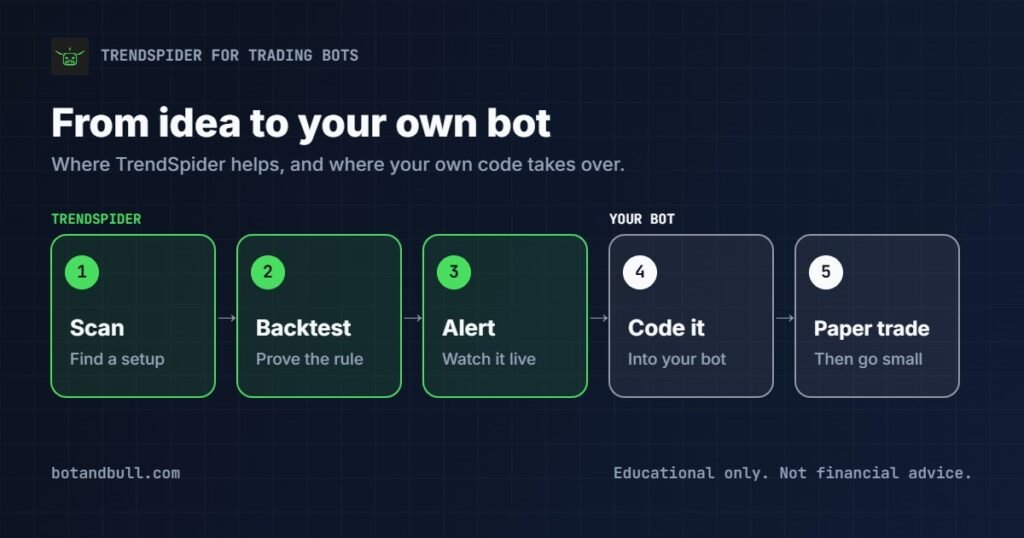
Here is the workflow I would use with it:
- Spot a setup with a scanner or an automated trendline.
- Backtest the rule in the Strategy Tester, then run a variance test across other symbols and timeframes.
- Set an alert, or a webhook to your own server, and watch how the setup behaves live for a few weeks.
- Code the version that held up into your own bot.
- Paper trade it until it gets boring, then go live small.
Software directories list TrendSpider without a public API for pulling its data directly into your own scripts. Webhooks and your own judgment are the bridge, not a data feed. For most builders that is fine: TrendSpider is where ideas get proven, and your bot is where they run.
What Reviewers Like
Across expert reviews and user reviews on sites like Capterra and Trustpilot, the praise is remarkably consistent:
- Automated trendlines and pattern recognition save hours of manual chart work.
- No-code backtesting makes strategy testing approachable for non-programmers.
- The platform updates often and keeps adding features.
- Support is responsive, and every plan includes at least one free one-on-one training session a year.
What to Know Before You Sign Up
No tool is perfect, and a few things are worth knowing going in:
- It is a paid platform. There is no free plan, and even the 14-day trial costs a small fee. It is priced above basic charting tools because it does a lot more.
- Give yourself time to learn it. There is a lot here, and new users say the interface feels busy at first. The included one-on-one training session is worth booking early.
- Know the refund terms. The trial fee is non-refundable, and a refund on a full plan has to be requested within 72 hours of the charge. Most user complaints I found came from people who missed that window.
- Build on desktop. The mobile apps are great for checking charts and alerts, but creating alerts and scanners is easier on a computer.
Plans and Trial, Without the Sales Pitch
TrendSpider sells four plans: Standard, Premium, Enhanced, and Advanced. Every plan includes every feature. What changes is capacity: how many alerts and bots you can run at once, how many scheduled scans you get, and how short a timeframe you can backtest and scan.
That last limit matters more than it looks. The entry plan backtests and scans down to two-hour bars. That is fine for end-of-day and swing ideas, but intraday strategies need a higher tier. Annual billing costs less than monthly, and new customers often see an introductory discount.
To try it, there is a 14-day trial for a small fee. Two practical tips if you do: set a calendar reminder before the trial ends, since subscriptions renew automatically, and know about the 72-hour refund window going in. Prices and promotions change often, so check the current numbers on TrendSpider’s pricing page before you sign up.
Who TrendSpider Is Best For
TrendSpider for trading bots makes the most sense for:
- Bot builders who want to test trading ideas before writing code.
- Technical traders tired of drawing trendlines and flipping through charts by hand.
- Anyone who wants alerts watching the market while they are at work.
- Beginners who want to see whether an idea holds up before learning Python to automate it.
If all you need today is a free chart, TradingView’s free plan covers the basics. TrendSpider earns its place once you are testing real ideas for a bot. And if you are just getting started, my guide on how to set up a trading bot from scratch is the best first step.
Why I Recommend TrendSpider for Trading Bots
I recommend TrendSpider for trading bots because it does the one thing most beginners skip: it proves an idea before you build around it. Automated trendlines and scanners find setups in minutes, the Strategy Tester and variance testing show whether a rule holds up without any code, and cloud alerts keep watch while you live your life. Reviewers consistently rank it among the most complete automation-first platforms for retail traders, and its popularity with readers here makes sense.
Pair it with a bot you build yourself, and you get the best of both: proven ideas, running on code you own. And whatever tools you use, learn the risks first. The SEC’s Investor.gov is a good, neutral place to start, and the rule here never changes: test on paper until it gets boring before real money goes in.
The Offer
Reader note, Halloween Sale (October 23 to November 2, 2026): TrendSpider is offering up to 50% off annual plans, two months of Sidekick Plus free with every plan, and a 14-day trial on any plan for $14. The $14 trial and the biggest annual savings end Tuesday, October 27. Promotions change often, so verify the current offer on TrendSpider’s site before you sign up.
Through Sunday, October 25: annual plans are up to 67% off, plus six months of Sidekick Plus free, on TrendSpider’s Beat Black Friday page.
Looking for the rest of the stack? See every layer, from brokers to servers to market data, on my trading bot tools I recommend page.
Disclaimer: Everything on this page is shared for educational and informational purposes only and is not financial, investment, or trading advice. I am not a licensed financial advisor, broker, or tax professional. Trading is a high-risk activity no matter what tools you use, and no platform is a shortcut to profits. Automated trading carries real risk, including the possible loss of your capital. Do your own research, and consider speaking with a licensed professional, before making any financial decision. This page contains affiliate links; if you sign up through them, Bot and Bull may earn a commission at no extra cost to you, and that never changes what I write.